The companion piece on AI-native operations makes the architectural argument: one tool layer that chat, the web app, and agents all dispatch through, so automation inherits the same permissions, governance, and audit trail as a person. This piece does the concrete version, one level deeper than a tour. It walks a single engagement from the first discovery call to the upsell that follows the wrap, and for each step it names the tool, the data it writes, the knobs you can turn, what happens when a model call fails, and where a human has to sign off. Every tool below sits in the same router to supervisor to worker path, governed the same way, traced the same way.
The one path everything takes
Before the lifecycle, the spine that makes it one machine instead of a folder of scripts.
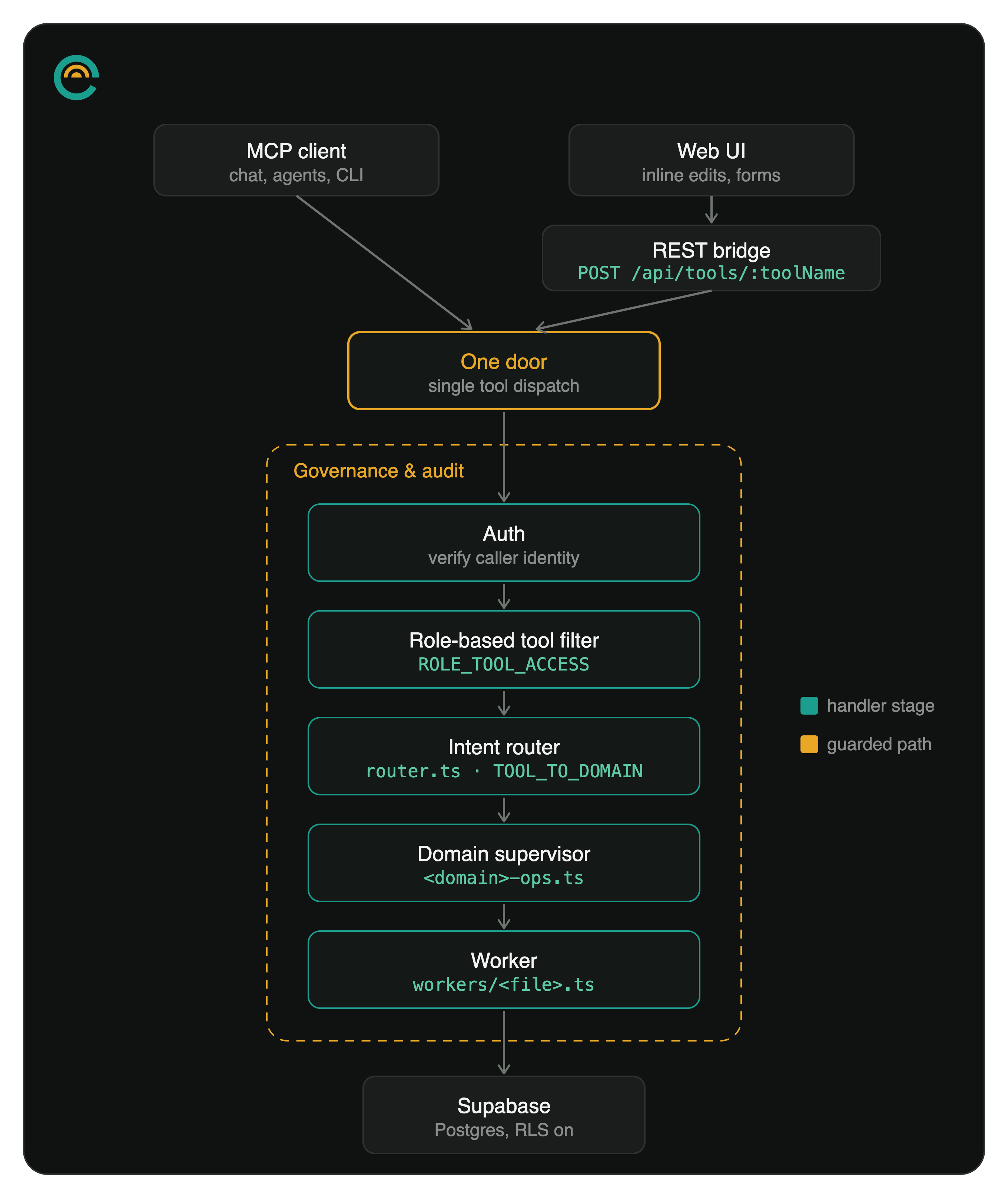
A request enters at a single door. An MCP client (your AI assistant, or the app's own in-app assistant) hits /mcp over streamable HTTP; the request authenticates by API key or Supabase JWT; a role-based filter narrows the callable tools to what your role can touch; an intent router maps the tool to its domain supervisor; the supervisor dispatches to a worker; the worker reads and writes Supabase. One handler runs auth, governance, dispatch, and audit for every call. The agent runtime underneath is LangGraph supervisors and workers with a Postgres checkpointer, so an agent's state is durable across a long run rather than living in memory that a crash would lose.
The rule that matters most for everything below: the tool layer is the only write path. The web app renders inline editing, modal creation, file upload, and embedded chat, but every write it issues rides the same REST bridge (POST /api/tools/:tool) into the same router, supervisor, and worker chain a chat message would. Direct database writes from the client are prohibited. So a field edited in the UI, a proposal generated from chat, and a scheduled agent updating a KPI all pass through one governed, audited path. A bug surfaces in the tool layer, not in three different write paths you have to reconcile.
Two invariants ride along on every table the lifecycle touches. Multi-tenancy is enforced at the row: every tenant-scoped table carries org_id with row-level security predicated on org membership, and the org is always taken from the caller's auth context, never from a parameter. Child tables that scope through a parent (a deliverable through its deal) use an EXISTS policy against the parent rather than denormalizing org_id down. On top of tenant isolation, memory is scoped per user: a teammate's private context is a fully-private partition that semantic retrieval filters out of everyone else's runs, invisible even to the owner.
The stack, for the record: TypeScript on Node 20+, a Hono server, Supabase (Postgres) for data, a React/TypeScript frontend, the Anthropic and OpenAI SDKs, Zod for tool schemas, LangGraph for the agent graph.
Discovery
Discovery is where an engagement gets understood or gets guessed at. In Emerjent a deal carries a structured discovery record: seventeen business fields (primary goal, pain points, what is not working, current tools, known requirements and risks, non-negotiables, hard deadlines, internal dependencies, how the client measures success, north-star KPIs, and the rest), plus the three fields most consultants gloss over, the economic buyer, the champion, and budget status, plus three transcript fields. You can paste a Fireflies transcript straight onto the deal and let the fields fill from what was actually said, instead of reconstructing the call from memory afterward. Updates partial-merge by default, so a second pass adds detail without wiping the first.
The discovery confidence score
Whether the rest of the engagement starts clean comes down to one thing: do you actually know enough to scope the work. Emerjent scores it, and the design of that score is deliberate, because the naive version does not survive contact with real deals.
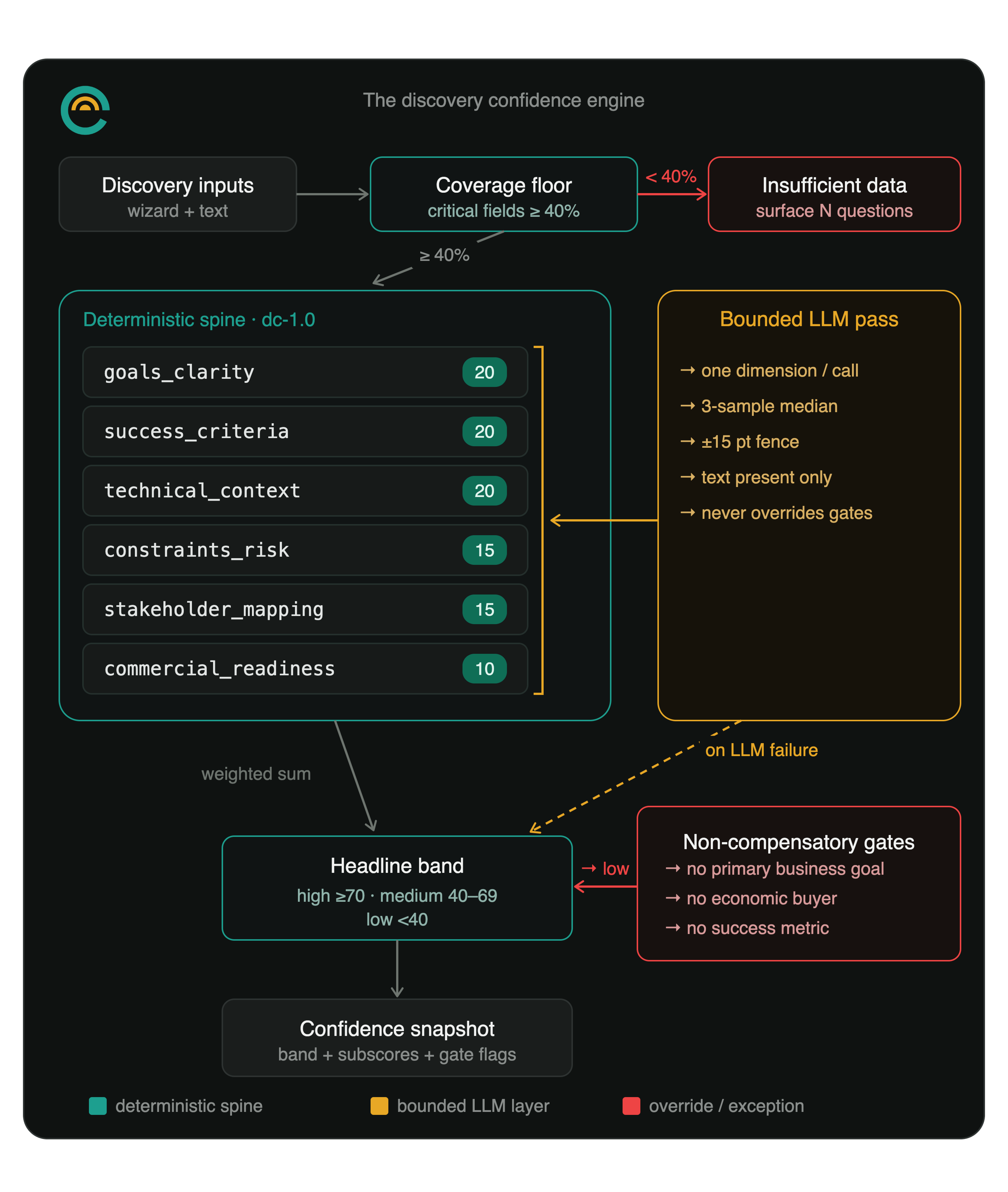
The engine is a hybrid. A deterministic spine carries roughly sixty to seventy percent of the score across six weighted subscores computed from the captured fields: goals clarity (weight 20), success criteria (20), technical context (20), constraints and risk (15), stakeholder mapping (15), and commercial readiness (10). On top of the spine sits a bounded model pass that reads how specific and measurable the captured content actually is and nudges each subscore, but only within fifteen points, and only downward from an overstated spine or upward toward a well-evidenced one. That pass scores one dimension per call against a fixed rubric order with a full-marks reference answer, and takes a three-sample median so one noisy read cannot swing the result.
The bound and the ensemble are not decoration. Single-call LLM rubric scoring is too unreliable to anchor anything that touches pricing or a go/no-go: test-retest agreement lands in the 0.27 to 0.79 range across models, verdict flips of up to forty-six percent show up just from reordering a rubric, and scoring several attributes in one call inflates their correlation well past what a human scorer produces. So the deterministic spine anchors the number and the model only adjusts inside a fence. If the model call fails, the score degrades cleanly to the spine, no error surfaced to the operator.
Two more design choices keep the number honest.
First, the gates are non-compensatory. A missing primary goal, a missing economic buyer, or no success criteria at all (both the how-they-measure-success field and the north-star-KPIs field empty) forces the band to low no matter how strong everything else scores. A glowing technical fit does not paper over the fact that nobody has confirmed who signs the check. A deal with a 9-out-of-10 technical fit but no confirmed economic buyer still lands in the low band. Gates change the band, never the number, so the underlying subscores stay legible while the headline tells the truth.
Second, a record with fewer than forty percent of its critical inputs filled does not get a fabricated low score. It returns an explicit insufficient-data band, with the coverage percentage stored in place of a score and the product surface reading "answer these N questions" rather than "you scored 22." Gates are not even evaluated in that state, because there is not enough signal to evaluate them against.
The band semantics are locked platform-wide so numbers calibrate across orgs and packs: high is seventy and up, medium is forty to sixty-nine, low is under forty, and insufficient-data is its own band below the coverage floor. What is not locked is org-configurable: the six weights, the gate toggles, the critical-field set, and the forecasting threshold all live in per-org settings, because what counts as a qualified deal differs by practice. Vertical rubric starting points ship as marketplace packs, so the configurability runs three tiers deep: platform default, then org override, then pack. You scope when the score says you understand the work, not when the calendar says the proposal is due.
Scoping
Scope is products and the deliverables under them, and the rollup is mechanical rather than a spreadsheet you maintain by hand. A deliverable's hours are hours-per-unit times quantity; its price derives from those hours at the org's resolved rate unless an explicit price overrides it; a product totals its in-cart deliverables. Hours are never discounted. Price is.
CPQ
Auto-apply discount rules read the cart and price it without anyone hand-editing line items. A rule fires on a cart condition and applies an effect. The conditions:
- Cart subtotal over a threshold.
- Product count over a threshold.
- A specific product present.
- An option group selected.
- A bundle present.
The effects:
- A percentage off matching products or the whole cart.
- A deal-wide percentage that stacks multiplicatively on top of per-product discounts.
- A fixed price rendered onto a bundle.
- A dependency product that the rule adds automatically when its trigger is in the cart and retires when the trigger leaves.
Two guardrails matter in practice. A discount you set by hand on a line is locked, and rules never touch it (clear it to reopen that line to auto-pricing). And every auto-discount is clamped to the org's maximum, so a stack of rules cannot quietly hand away the margin. Before anything writes, you can preview the effective discount on each cart line as a dry run, which resolves the rules and reports the result without mutating the cart.
Capacity planning
Before you commit a date, capacity planning answers whether the team can take the work. It reads tracked hours against per-member weekly capacity, with per-day breakdowns and date-range overrides for vacation or a reduced schedule. The forecast action takes a required-hours number and returns a projected start and end given current load. The estimate that fed the quote and the team's real availability live in one system, so "yes, by the 30th" is a calculation rather than a hope.
Proposal
A proposal generates from the scope, and the version a client sees is redacted at the source, not in the template. The redacted payload carries no hours, cost, internal price, margin, or rate; products are filtered to the ones marked client-available; signatures are shaped for the client side. An operator can preview-as-client to see the exact redacted payload before sending.
The redaction is a database view with a strict one-way downgrade, and the one-way part is the security property. The preview role can only ever narrow what you see, never widen it, so a client view can never escalate into the internal one by fiddling with a parameter. There is a second boundary for white-label work: an external contracting agency (a partner reselling your delivery under their own brand) sees the agency payload minus internal cost, margin percent, and the top-level hourly rate, so the operator org's economics never cross the reseller line. Sending advances the deal from scoping to proposal and notifies the client.
Billing
Billing lives on the proposal. Two models. Time-based billing is a schedule of installments whose percentages sum to a hundred. Deliverable-based billing maps milestones to the deal's selected deliverables, with the constraint that no deliverable is assigned to two milestones; milestones over deliverables is milestone billing.
Options, wishlist, exclusion
A scope line carries a selection kind. Fixed lines always ship. Optional lines are add-ons the client can toggle in or out. Exclusive lines belong to an option group: the client picks one per group, and rather than pretending there is a single number, the deal summary reports a price-and-hours range (a minimum to a maximum) plus the fixed, un-grouped portion.
Two statuses keep the rest of the conversation on the record without inflating the price. Wishlist holds what was discussed but not committed; those lines sit on the deal and stay out of the cart total. Exclusion records what was explicitly scoped out, so "that is not in this engagement" is written down once instead of relitigated in month three. Both survive a scope restructure, so reorganizing the cart never loses them.
The closed-won workflow
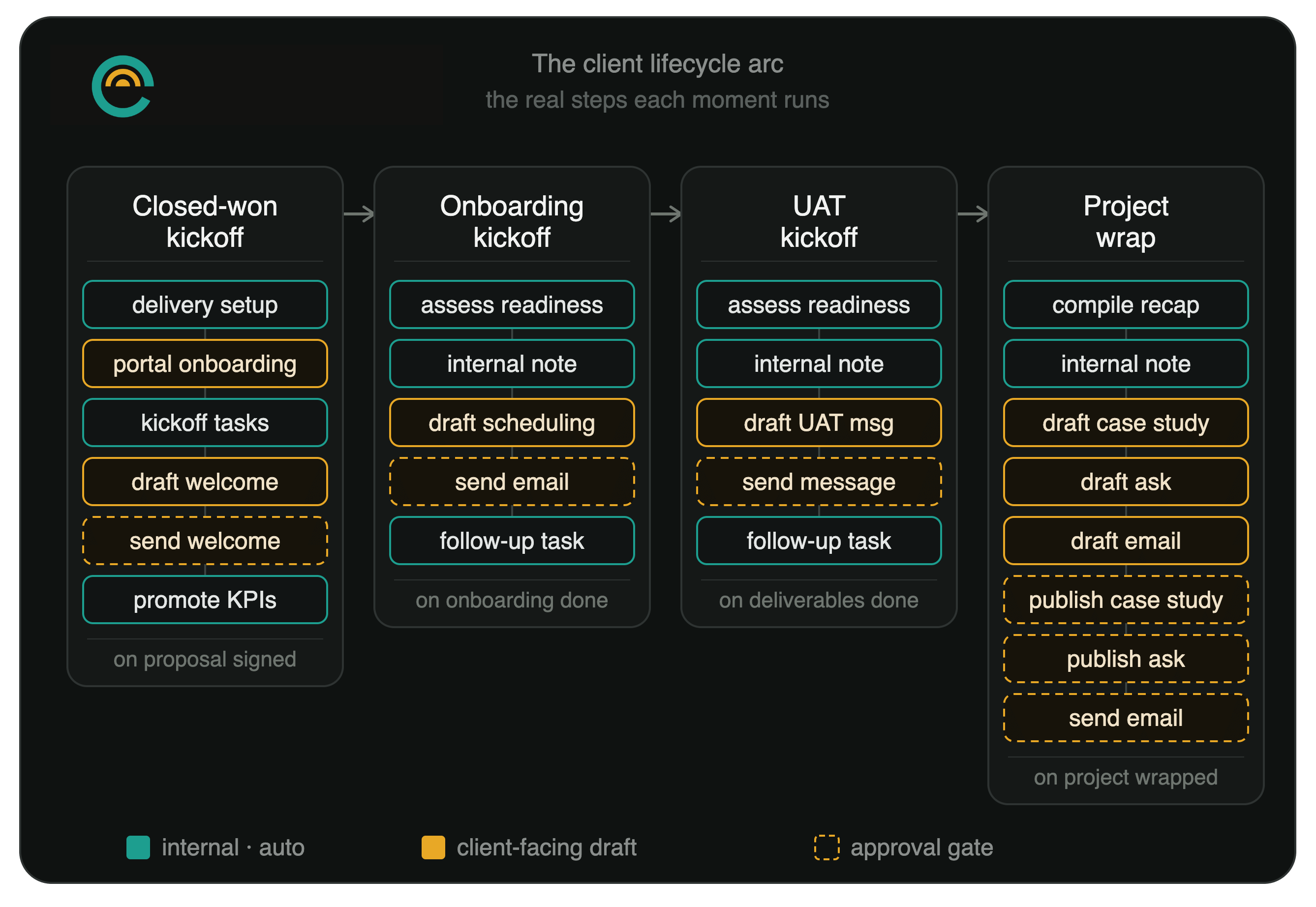
When a consulting deal reaches Closed Won, the kickoff fires itself off the locked signed scope-version snapshot, the authoritative record of what was agreed. It fires on the close itself, so a hand-keyed close and a self-serve signature start the identical chain. Five steps:
- Delivery setup: read the signed scope, then create the phases, deliverables, and payment schedule that mirror it exactly, with hours carried from the scope and billing set to the chosen method.
- Portal onboarding: stand up the client's onboarding checklist (brand assets, designs, access and credentials, prerequisites, point of contact) and publish a welcome update to the portal. Portal-facing setup, not direct outreach.
- Kickoff tasks: create the internal to-dos (schedule the kickoff call, gather access, set up the project channel, start the week-1 deliverables), anchored to the delivery phases so nothing duplicates.
- Client welcome, drafted: write a warm welcome-and-next-steps message. Draft only; it sends nothing.
- Send welcome, approval-gated: after review, send the approved message through the native message tool. The chain parks here until a human approves.
The middle three steps run in parallel off delivery setup, since none of them depends on the others. This is the first appearance of the shape every lifecycle chain shares, and the engine section at the end names its parts.
Onboarding
Onboarding steps come in four kinds: a generic action, a credential request, a file upload, and an info acknowledgment. Setting a due date on a step turns it into an active inbound request. It reminds the client and surfaces in their Action tab until it is fulfilled, which is how "we are waiting on you for X" stops living in your head and starts living in the client's view.
Secret management
Clients hand over secrets during onboarding (an API key, a private app token, a platform password), and that handoff is exactly where most agencies fall back to email or a shared doc. The credential tool requests a secret with a label and instructions; the client submits it through a JWT-authenticated endpoint that encrypts it app-side, so the request path never carries the plaintext. After submission it is masked by default. Nothing returns the value except an explicit reveal, reveal is owner-or-admin only, and every reveal writes to an audit log with an optional reason. A stored secret can be rotated (cleared and re-requested), revoked (closed and wiped), or pulled directly into the org's provider-key store, all without a human copy-pasting it anywhere.
Client reminders
The due-date mechanism is the reminder engine. A client-owned item that goes overdue gets a first nudge at the due date, then one every three days, capped at three. An item with no due date that sits idle for seven days gets a weekly nudge, also capped at three. The cadence runs off a scheduler sweep, not a person remembering to chase, and it reaches the client both in-app and by email.
Kickoff workflow
When the last required onboarding step closes, the onboarding-kickoff chain runs five steps:
- Readiness assessment: read the client's delivery state and report which phase is next and any gaps that would block starting. Read-only.
- Internal milestone: log a team-only deal note that onboarding is complete and the engagement is ready for delivery. If it cannot resolve exactly one matching deal, it says so instead of guessing.
- Find times and draft: read the team's Google Calendar through Composio for open one-hour weekday blocks (9am to 4pm Mountain, within the next 14 days), then draft the onboarding-complete email proposing two or three real times. If it finds fewer than two open blocks, it refuses to invent times and flags that at the gate instead.
- Send kickoff email, approval-gated: after review, send the approved email through the native message tool. The chain parks here until a human approves.
- Follow-up to-do: create a human task to await the client's reply and book the call, due in three business days, so the thread does not go quiet.
The find-times step is the one people do a double-take on: the chain reads the real calendar and proposes open slots, and it still will not send anything until a person signs off. Reading a calendar through a connector is fine; sending through one is not. That gate is the house pattern, and it repeats across every lifecycle chain.
The client portal
What the client gets is a branded portal, not the machinery behind it. The tabs cover the project (phases and deliverables), an Action tab, shared assets, an updates feed, messages, meetings, UAT, and KPIs. The portal runs in a payments mode or a tracked-hours mode depending on how the engagement bills, and showing hours is a per-client toggle. It is agency-granted and agency-governed throughout: the client logs into a home you control, not a chat window into the agent layer.
Client health score
Health scoring runs per engagement and raises alerts split by scope. Client-scoped alerts, about a single engagement, feed the Client Health view. Agency-scoped alerts (quota, billing, integration failures) feed the dashboard. The split keeps a client's own page free of billing-system noise and keeps the agency dashboard from drowning in per-client detail.
Data readiness
For clients on HubSpot, the CRM under the engagement is usually the thing quietly breaking the automation you were hired to build. AI Data Readiness is a productized audit, remediate, and monitor capability for exactly that problem. It is in build, not shipped; the remediation engine and the fix-manifest contract are acceptance-passed against a sandbox portal and the per-client connector binding is built, with the customer-facing surface and the run-audit orchestration next. What follows is the design, spoken as roadmap.
Initial audit
The audit reads the client's CRM read-only and reports the defects that break agents: duplicate records, broken associations, inconsistent enum and stage usage, records gone stale past a threshold, orphaned records with no owner, and missing critical fields measured as fill rates. A remediation planner turns the findings into a reversible fix manifest, which waits for approval. Only on approval does a remediation executor apply it against HubSpot. HubSpot stays the source of truth; the changes are deterministic and reversible; the resulting readiness score lands in the org's Databox data-quality dataset, so it is a number tracked over time rather than a one-time read.
Weekly reconciliation
A scheduled monitor chain re-runs the checks on a cadence so the cleanup holds. Drift resurfaces as a fresh finding the week it happens, instead of as an agent that has been silently degrading for months.
Delivery
Phases
Delivery is organized into phases, each holding deliverables with status, due dates, and estimated and tracked minutes. When a phase or deliverable is deleted, tracked time is not cascade-deleted; the link is nulled instead, so restructuring scope never destroys the hours already logged against it.
Task tracking
The internal to-do list is the operator-and-agent work surface: tasks with status, priority, assignee, due date, estimated minutes, and links to a deal, client, or deliverable. It is deliberately separate from the client's Action tab. Internal tasks never get exposed raw to a client.
Time tracking
The built-in timer replaced Toggl in this practice. Time logs against the specific deal and deliverable it belongs to. Timers can run concurrently for parallel workstreams (up to five), entries batch-import from a spreadsheet, and each entry carries an AI-assisted flag that feeds ROI attribution later. That flag is not cosmetic: it is the input to the ai_touched_ratio the ROI view computes per deliverable.
Actions
The client-facing Action tab merged two things that used to be separate: client tasks and the approvals log. Now a client completes tasks, approves or requests changes, and comments in one place. Operators write to it through the action tool, and the reminder cadence above keeps client-owned items from going stale.
Assets
Shared files, images, video, embeds, and links go into the portal as assets, optionally attached to a specific deliverable so they show in context in the client's project view. An embed (a Loom, a Figma frame, a Drive preview) renders inline; a plain link shows as a link. An agency-side add notifies the client.
Updates
The updates feed publishes either immediately or as a draft only the agency can see. The draft is the review step for a model-drafted update: it stays invisible to the client until a human one-click publishes it. Update types include milestone, delivery, kickoff, sprint wrap, retro, and wrap.
Messages
The message channel is the only path a workflow step is allowed to send client email or messages through. That is a standing rule, not a default. Every send step in any chain is approval-gated, drafting and sending are separate steps, and no workflow sends client email through Composio, Gmail, or LinkedIn. Reading a calendar through Composio is fine; sending is not. This single-path rule is what lets the closeout chain draft a case study, an ask, and an email on its own and still guarantee nothing reaches the client without review.
Meetings
Meetings record a summary plus action items, and each action item toggles complete on its own. The Fireflies webhook feeds transcripts in after a call, so the meeting record and its action items exist without anyone writing them up by hand.
UAT
Internal
Acceptance testing runs as rounds of items, each item carrying an ordered verification checklist. The agency checks items off with an admin status (pass, fail, blocked, skipped), marks which verification steps it verified, attaches screenshots or video, and records resolution notes. A round stays a draft, agency-only, until it is published.
Client-facing
Publishing a round makes it visible to the client, who responds through the portal on a separate write path from the agency's checkoff, so the two never overwrite each other. Opening that round to the client can be a triggered step rather than a manual one. The client-uat-kickoff chain fires on the deliverables-complete handoff, the specific condition being that deliverables are complete and the internal UAT pass is verified but client UAT has not started, and runs five steps:
- Readiness assessment: read delivery and UAT state, confirm every item passed internal verification, and note which round is published and where in the portal the client completes it. Read-only.
- Internal milestone: log a team-only deal note that deliverables are complete, internal UAT is verified, and client UAT has been requested.
- Draft the message: write the client UAT-kickoff note with step-by-step portal guidance: where the UAT section is, the per-item checklist, how to mark an item passed, and how to flag an issue with a note and a screenshot.
- Send, approval-gated: send the approved message through the native message tool after review.
- Follow-up to-do: create a human task to await completion and review results, due in five business days.
The only state write before the gate is the internal note, so nothing client-visible moves until a person approves.
KPI tracking
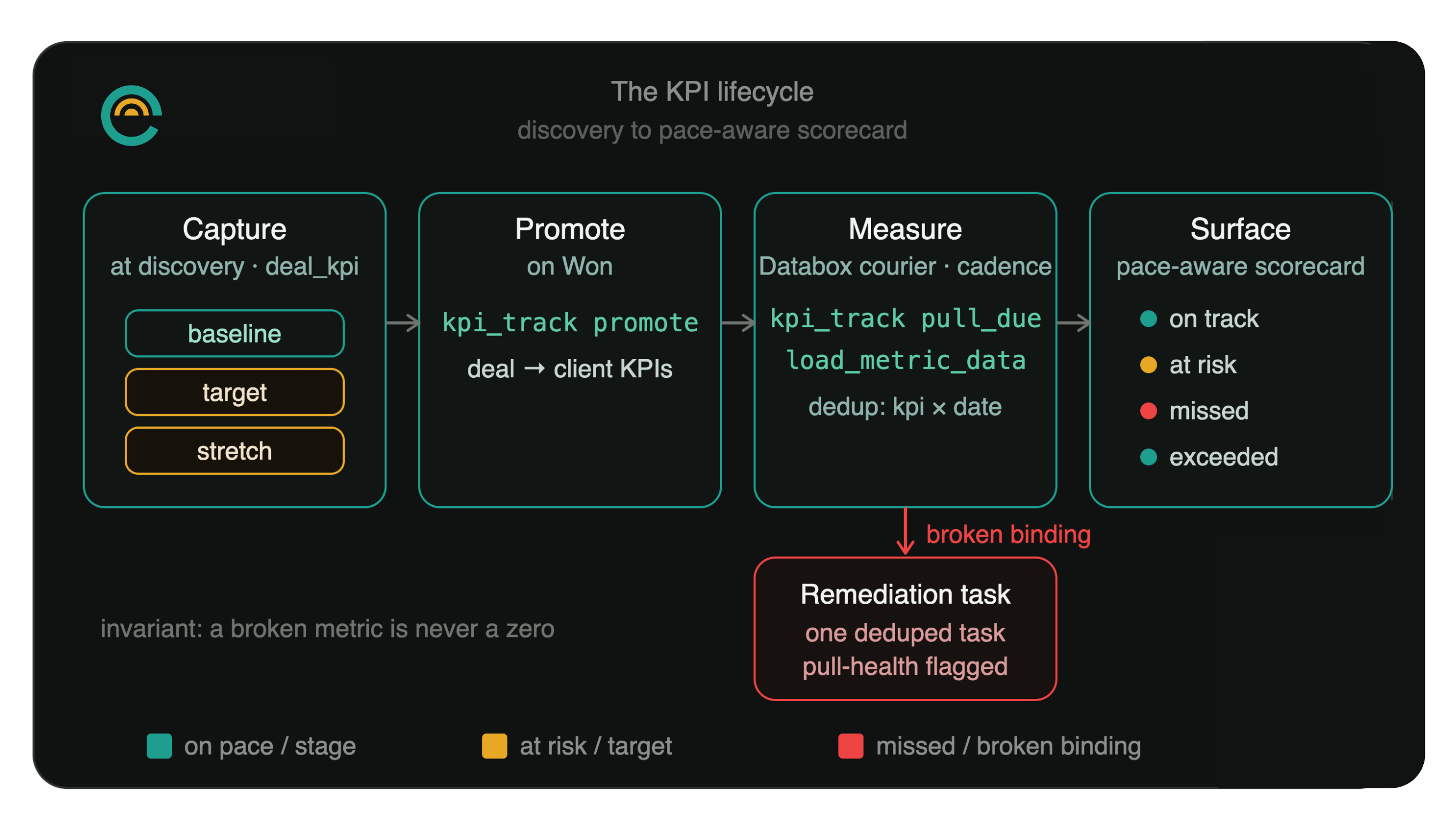
The KPIs you will be judged on are captured in discovery, not invented at the first report. Each one is recorded as a baseline, a target, and a stretch, with a direction that says which way is good. New KPIs start as drafts so half-formed ideas do not leak into the proposal; marking one client-visible surfaces it in the proposal and the portal. When the deal is Won, the active KPIs promote into the client as tracked KPIs, and the scorecard reports each as a pace-aware status (met, exceeded, on track, at risk, missed, awaiting baseline, or paused) banded teal, amber, or red. On-track accounts for where the number should be by now given the measurement window, not just whether it moved at all.
Here is what that looks like on a real deal. A KPI tracking deal-closure time might carry a baseline of 30 days, a target of 25, and a stretch of 20. Six weeks into a 12-week engagement, on-track does not mean "the average moved down at all." It means the average sits below roughly 28 days by now, the number the pace curve expects at the halfway point between baseline and target. Missing that pace mark flips the status to at-risk even though the metric is still improving, because improving too slowly to hit the target on time is its own kind of failure the client needs to see early.
Sync with Databox
Databox runs in both directions, and the read direction is deliberately model-free. Outbound, the platform computes the org's operational metrics by deterministic SQL and pushes them to the agency's own Databox account daily, with no model in the loop and no customer database credentials distributed (it is push, not pull). Inbound, a KPI bound to a Databox metric is read by a courier on a schedule: it lists the KPIs due for the current closed window, reads each value through the org's Databox connector, and writes the measurement, all as a deterministic zero-model tool step. The failure handling is the part worth naming: a null or failed read does not log a zero. It flags the binding broken and raises a single deduped remediation task, so a dashboard outage never looks like a KPI that collapsed.
KPI reconciliation workflow
The reconciliation runs on schedule. Due KPIs get measured on cadence, the scorecard recomputes pace-aware status, and an at-risk roll-up surfaces every client KPI sliding red across the whole book, for the dashboard panel and the morning briefing. When a KPI crosses into at-risk, that condition fires a remediation workflow: a single analyst agent pulls the measurement trend together with the deal's discovery context (the pain points, what was not working), delivery status, and recent time entries, and produces an internal remediation brief covering the situation, the likely drivers, prioritized interventions, and an optional clearly-labeled draft note. The analyst has no client-facing tools and never sends or publishes, and the step is approval-gated on top of that as a governance backstop. The brief lands as a read, not a message to the client.
Monthly client performance reports
The monthly report runs as a three-step chain, and the middle step is a small lesson in cost control:
- Gather metrics: pull the agreed metric set from the client's Databox account through the Databox connector and return a plain table. The step is blunt about not inventing figures: it records an error verbatim in the value cell rather than guessing, and retries a throttled call once before marking the metric unavailable.
- Narrate: write the report with no connectors loaded at all, because writing prose does not need a metrics API and dropping the tools cuts the step's token cost. Every number has to trace back to the gather step's table, and the prose ties the movements to the client's stated goals.
- Publish, approval-gated: stage the report as a portal draft behind a gate. With no portal client specified, it returns a review-ready draft and sends nothing.
The report files as a deal-and-client-linked knowledge resource, so it is searchable and lives alongside the rest of the engagement's record rather than in a separate reporting silo.
Project close
When an engagement wraps, the closeout runs itself. The condition is specific: all deliverables terminal, all UAT rounds complete, and the engagement quiet for at least seven days. The project-wrapped workflow is eight steps, and the shape is the part worth seeing:
- Wrap assessment: one read-only step reads delivery state, UAT state, the deal, recent messages, and meeting logs, and compiles a single recap: the original goal, what shipped, the timeline, real metrics, and any quotable client feedback.
- Four drafts in parallel (each depends only on the assessment): an internal wrap note (no stage change, the deal is already Closed Won), a case study, a combined testimonial-and-referral ask, and a short wrap-up email.
- Three approval gates that surface together: the publish-case-study, publish-ask, and send-email steps each depend only on their own draft, so all three land for review at once and a person can approve, edit, or reject each in one sitting.
On approval: the case study and the ask publish to the portal (the case study also records to the case-study tool for the institutional record), and the email sends through the native message tool only.
The drafting agents are held to the same rules the rest of the lifecycle uses: real metrics and real quotes only, never invented, and if the chain cannot resolve exactly one matching deal it reports that rather than guessing. It shipped observe-only first, like every event trigger here: a new trigger records what it would have fired and touches nothing until someone promotes it, and promotion pre-claims the existing backlog so every already-wrapped client does not get a closeout email on the first live tick.
Advocacy requests
The advocacy ask packs the testimonial request and the referral request into one step, drafted by the wrap chain and gated like everything else that reaches a client.
Review and case study
A case study moves from draft to approved to published. Approval stamps the reviewer; publishing stamps the date and is the only route to published, so a published case study cannot be quietly unpublished by a later edit. The record holds the collected testimonial, a client rating, highlight metrics, logo-use permission, and the SEO and structured-data fields, which means an approved case study is ready to ship as a marketing asset without a second build.
Upsells
The wrap is also where the next engagement starts. The internal wrap note and the case study together are the upsell brief: what was delivered, what moved, and what is still sitting on the wishlist from the original scope. A new consulting deal opens at Discovery, and the lifecycle starts over with the prior engagement's full record already in hand.
How the automations actually run
Every chain in this article is the same kind of object, and it is worth taking the object apart, because that is where these stop being scripts and become something an operator can hand client work to. A workflow is an ordered set of steps; each step hands an agent a templated instruction (with {{var}} interpolation from the run's context) and the step either runs that agent, runs a native tool directly with no model in the loop, or just waits. The interesting part sits between the steps.
Steps form a graph, not a line
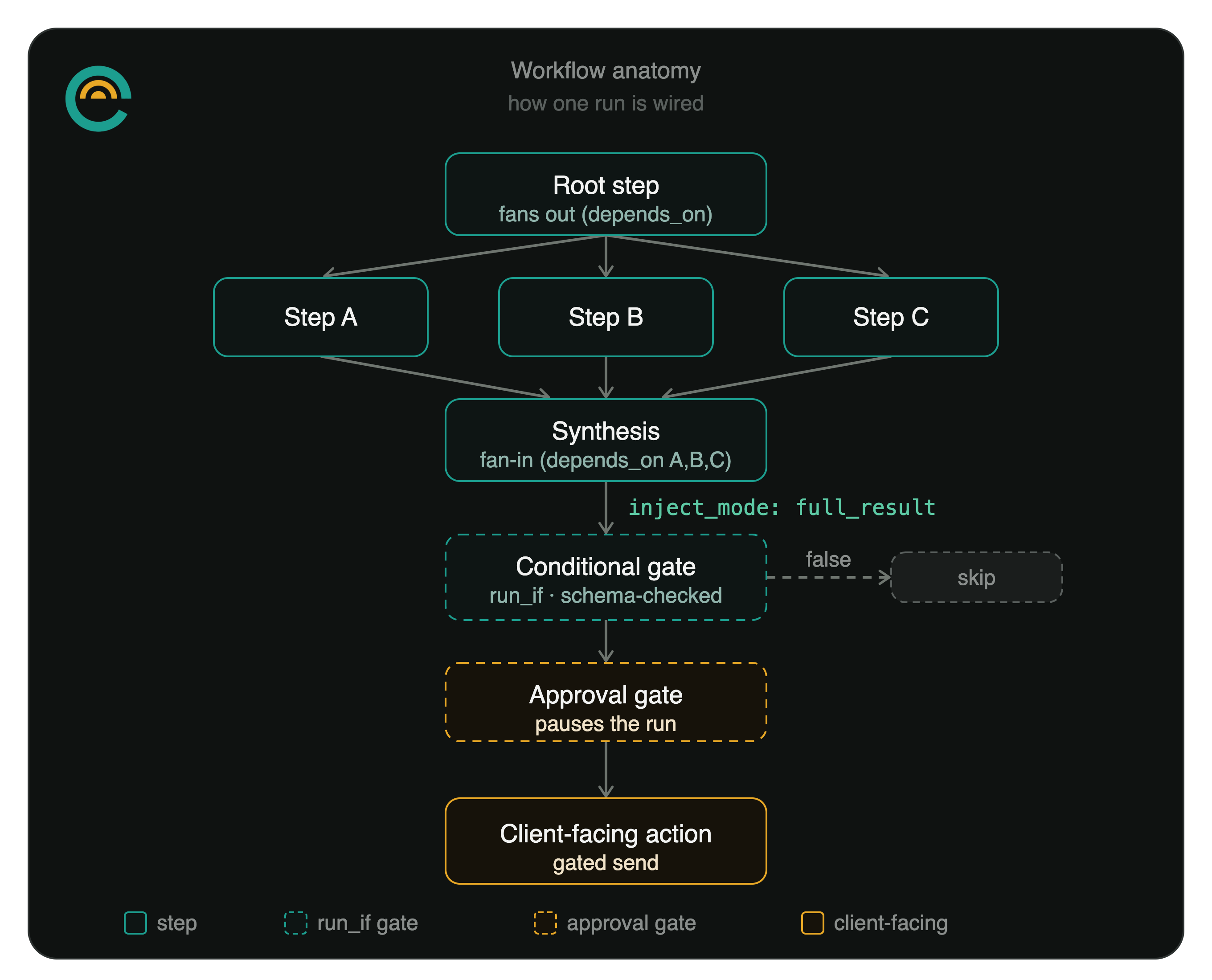
A step declares what it depends on, so a workflow is a directed graph rather than a straight line. The capacity brief is the clean illustration:
- Three parallel pulls (no dependencies): pipeline activity, client-health signals, and time-and-capacity data, each gathered by its own agent at the same time.
- Synthesis (depends on all three): fold the three reports into one brief with a short summary, a section each, and the top three recommended actions.
- Persist (depends on synthesis): write the brief to the knowledge base, tagged and filed.
The project-wrapped closeout has the same shape pointed the other way: one assessment fans out to four parallel drafts, and three gated publishes each hang off a single draft. Parallel work runs in parallel, the joins wait for everything they need, and nothing gets hand-ordered after a step it does not actually depend on.
How a step sees the one before it
Each step chooses how much of its predecessor's output to carry forward. The default is a summary. A step that needs the full prior payload (the synthesis folding three reports together, a publish step carrying the exact approved draft) takes the full result. A step that needs only certain fields pulls just those. This is not cosmetic. It controls both what the agent reasons over and how many tokens that reasoning costs.
Scoping a step to the tools it needs
A step can also be scoped to specific connectors, which is the cheapest lever on cost in the whole system. In the monthly report, the gather step loads the Databox connector because it has to read metrics, and the very next step, the one that writes the narrative, loads no connectors at all, because writing prose does not need a metrics API and dragging the connector's tool schemas into that step would burn input tokens for nothing. Per-step connector scoping keeps a media workflow on HubSpot only, an ops workflow on its issue tracker only, and a writing step on nothing.
Per-step overrides
A step can override the agent's own config for the length of that step: a tighter max-iteration cap, a specific output parser, a fallback strategy, or an output schema the step must return. The output schema is what makes the next lever safe.
Gates pause the run, they do not race it
A step marked for approval stops the workflow before it runs and files an approval request. Approving releases that one step; rejecting cancels the run from there. For higher-stakes work the gate can be a multi-stage chain: stage two opens only once stage one collects its required approvals, any rejection is terminal, and the approvers can be required to be distinct people. The standing rule across every client-facing chain is that drafting and sending are separate steps and the send is the gated one, so an agent can write the email but a person decides whether it goes, and the send routes only through the native message tool, never a side channel like Gmail or a Composio connector.
Branches, waits, and tool-only steps
Two more step kinds round out the engine. A step can carry a conditional gate: a declarative comparator over an earlier step's structured output, evaluated at run time, that skips the step (and lets the chain continue) when it comes back false. The branch can only read from a step whose output is structured and schema-checked, so a conditional never hangs off a free-text blob it might misread. A step can also be a pure delay, which is how you build "draft this, wait three days, then send" without a person babysitting the gap. And a step can be deterministic: the scheduled Databox KPI pull runs as a native tool call with no model in the loop, so a recurring data movement costs nothing in model spend, and the Stripe-payment workflow records an inbound payment idempotently (keyed on the payment id, so a webhook retry never double-posts) and drops a note in Slack.
Three ways a workflow starts
The same workflow can be set off three ways, and the path behind it is identical each time.
- A person runs it from chat or the app, passing its inputs.
- A cron schedule fires it, evaluated in the agency's own timezone. The morning and afternoon briefings post to Slack on weekday schedules; the meeting-prep chain runs every thirty minutes during business hours, scans the next forty-five minutes of calendar, and fans out one prep brief per external meeting.
- An event fires it. A condition holds for a subject (a client finished onboarding, a deal hit Closed Won, a KPI went at risk, a project wrapped) and the matching trigger instantiates the workflow with inputs mapped from the event.
Automation that fires itself ships careful
Event triggers carry more risk than a button a person clicks, so they default to safe. A new trigger starts observe-only: it records what it would have fired and touches nothing. Going live is a deliberate promotion, and at promotion the platform pre-claims the current backlog so a year of already-qualifying subjects does not stampede on the first tick. Live triggers then run inside ceilings: a per-trigger fire-rate cap that auto-deactivates the trigger and raises an alert rather than running away overnight, a loop-depth cap so chains cannot trigger each other into a spiral, dedup so a given subject fires once ever (or once per cooldown window), idempotency keys so a duplicate event cannot spawn a second run, and kill switches at both the org and the platform level.
You can see what each run did and what it cost
Every run leaves a trace (which tool, which agent, which worker, the latency of each phase) and resolves its model spend to the agent that incurred it. The workflow catalog even carries a per-run cost estimate drawn from real history where the chain has run before: the morning briefing runs a bit over a dollar a day, the monthly report under a dollar, the deterministic Stripe and KPI-pull steps a rounding error. "What did the automation cost this month, and which chain spent it" has an answer broken out by chain.
The catalog, as evidence
This is not one or two showpiece chains. The practice runs twenty-two workflows: the engagement-lifecycle chains above (kickoff, onboarding, UAT, closeout), the content pipelines (research to draft to voice review to revision to SEO to cover image to a gated quality check, for both the blog and the marketing site), the daily operations chains (the briefings and meeting prep), the agency capacity brief, and the memory and learning loops that run on their own schedules. Each one is the same object built the same way, which is the practical payoff: the second workflow is cheaper to build than the first, and the fiftieth is a variation on a pattern the operator already trusts.
The layers underneath every stage
The lifecycle sits on a few cross-cutting layers that a technical reader will ask about. Each has its own companion piece; the shape is here.
Isolation. Every tenant-scoped table carries org_id with row-level security predicated on org membership, taken from auth context and never from input. Join-scoped child tables scope through an EXISTS policy against their parent rather than a denormalized column. Above tenant isolation, memory is scoped per user: a teammate's private context is a fully-private partition that semantic retrieval filters out of everyone else's runs, invisible even to the owner. Service-role paths (seed scripts, cross-org admin tools) bypass row-level security by design and are responsible for their own org scoping, which is a rule the codebase enforces rather than a hope.
The knowledge substrate. This is the "gather your client context once" foundation the whole lifecycle reads from. Retrieval is hybrid, a vector leg and a lexical leg fused, then ranked by a live strength score (a seven-component blend: recency, how fresh a resource is; frequency, how often it's cited; query diversity, how many different searches surface it; conceptual centrality, how often it bridges topics; confidence, how sure the system is; validation recency, when it was last confirmed; and source trust, who created it) and diversified so the same few documents do not win every query. Human annotations on a resource are kept out of the embedded content so a note never pollutes retrieval. A nightly consolidation cycle proposes structural changes to a review surface rather than writing them silently, and a demotion can be reverted to its exact pre-cycle snapshot. On top of that, a correction-learning layer captures the edits you make to agent output and, after a nightly miner clusters recurring ones, files a single candidate house rule as a write-intent for you to approve before it ever injects. The memory and learning companion pieces go the full distance on this.
Governance. Governance middleware gates client-facing and agent-write actions before they execute, and an agent's proposed writes queue as write-intents you approve or reject. Both surfaces feed one exportable audit trail: a single owner-or-admin tool assembles the ordered approval decision-chain across human approvals and agent write-intents, strictly org-scoped, and hands it back as JSON plus a generated CSV suitable for a client's compliance team. The governance companion piece covers the gate model in full.
Cost and reliability. Model keys are per-org and encrypted (bring your own), with a per-agent model-preference chain and provider fallback that runs provider-direct (Anthropic to OpenAI) with no proxy in the path. Spend resolves to the agent that incurred it, cost canaries watch per-agent and org burn, and mid-run context compaction keeps a long run coherent by folding older exchanges into a running summary while the objective and the latest turns stay verbatim (a reliability capability, shipped but gated off pending per-agent rollout). ROI rolls up as a three-parameter view where attributed AI revenue is the deal amount times the deliverable's AI-touched ratio times an attribution factor, so the number a client's finance team sees is derived, not asserted.
The thread through all of it
Every one of these routes through the same supervisor and worker: discovery scoring, CPQ, proposal billing, credential intake, the Action tab, the KPI courier, the wrap chain. It doesn't matter whether a person typed the request in chat, clicked it in the portal, or an agent woke up on a schedule. The gate is the same gate everywhere, which is why client-facing sends pause for approval no matter what started them. The trace is the same trace everywhere: every run knows what tool ran, who asked for it, which worker executed it, and what it cost.
The Client Lifecycle workflow folder holds the spine as a connected arc: closed-won kickoff, onboarding kickoff, UAT kickoff, project wrap. Each was built on the same pattern (read-only assessment, internal note, draft, approval-gated client action), and each shipped observe-only before it went live.
Built on a real practice
None of this was specced in the abstract. The first production tenant was the builder's own consulting practice, and the platform now runs across multiple production organizations. Peak Paws OS, an operations system for a veterinary rehabilitation practice, is the named client proof: a real portal, real delivery tracking, real time entries against real deliverables. The lifecycle in this article is the one the practice actually closes and delivers engagements through, which is why each failure was the operator's own problem before it could ever become a customer's.
For the architecture underneath (the single write path, the three ways work starts, the cost ledger), the umbrella piece on agency operations covers that ground. Three companion deep dives go further on the parts that draw the most questions: memory, learning, and governance.